> ## Documentation Index
> Fetch the complete documentation index at: https://docs.dcdeploy.com/llms.txt
> Use this file to discover all available pages before exploring further.
# Clone Service
> DCDeploy allows you to **clone an existing service** with a single click. This is useful when you want to create a new workload with the **same configuration** (build settings, ports, scaling rules, environment variables) as an existing one.
***
## When to use Clone
* **Staging and Production** → Duplicate your service and point it to a different branch or database.
* **A/B Testing** → Run two versions of the same service with small differences.
* **Quick Setup** → Save time instead of re-entering build and scaling options manually.
***
## How to clone a service
1. Go to your **Environment Dashboard** → **Deploy tab**.
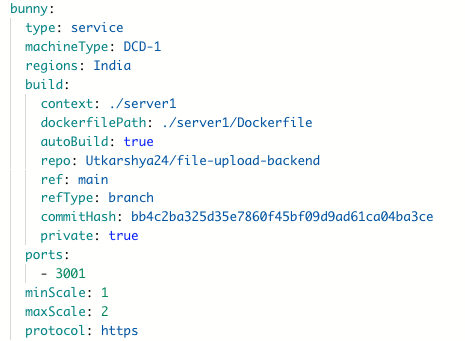
2. Select the service you want to clone (e.g., `bunny`).
3. At the bottom of the service card, click **Clone**.
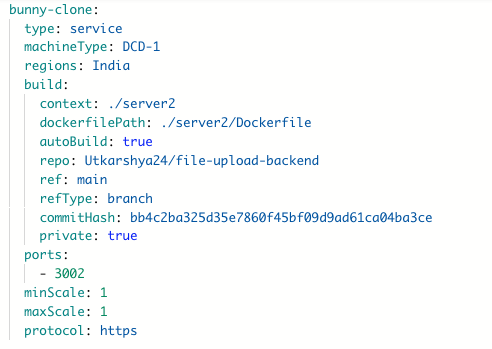
4. A new service (`bunny-clone`) will be created with identical configuration.
5. Update the cloned service:
* Change **name** to avoid conflicts.
* Adjust **repository ref / branch / commit** if needed.
* Modify **ports** if both services must run simultaneously.
* Update **environment variables** (e.g., different API keys).
***
## Example: Cloning `bunny`
Original service:
 Cloned service:
 ***
## Best practices
* **Rename immediately** to avoid name conflicts.
* **Keep configs in sync** with environment variables.
* **Use cloning for speed**, but review each setting before deployment.
***
***
## Best practices
* **Rename immediately** to avoid name conflicts.
* **Keep configs in sync** with environment variables.
* **Use cloning for speed**, but review each setting before deployment.
***