> ## Documentation Index
> Fetch the complete documentation index at: https://docs.dcdeploy.com/llms.txt
> Use this file to discover all available pages before exploring further.
# Environment Variables
> Environment variables let you configure services in DCDeploy without hard-coding values into your source code or container images. Use them to define secrets, connection strings, API keys, and runtime configuration.
## Adding environment variables
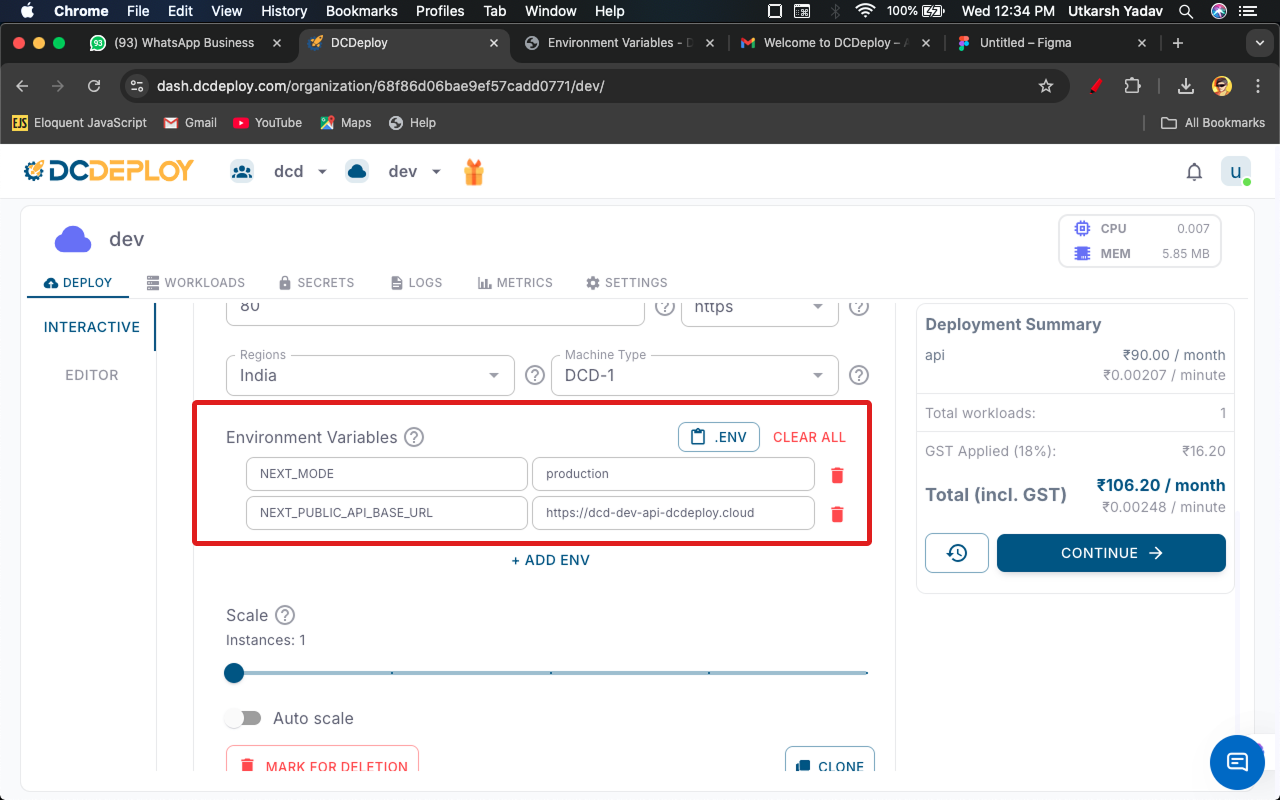
You can define environment variables while creating or updating a deployment:
1. Go to your **Environment Dashboard** → select your service.
2. add service and add **Environment Variables**, click **Add Variable**.
3. Provide a **key** and **value**.
4. Save changes and **redeploy** for updates to take effect.
**Quick Option:** You can also copy-paste the content of your `.env` file directly using the **`.ENV`** button in the form. DCDeploy will automatically parse and add the variables.
***
## Secrets management
Sensitive values (e.g., database passwords, API keys) should be stored as **secrets**. DCDeploy automatically encrypts them and injects them at runtime.
Example:
 ***
## Overriding variables
* Variables defined in the dashboard UI override those in the manifest.
* Redeployment is required for changes to apply.
* Deleted variables are removed from the runtime environment on next deploy.
***
## Best practices
* **Never hard-code secrets** in images or code.
* **Use different env files** for dev, staging, and production.
* **Prefix variables** for clarity (e.g., `DB_HOST`, `REDIS_URL`).
* **Keep non-secret configs** (like `LOG_LEVEL`) separate from sensitive ones.
***
## Example usage in code
```javascript helloWorld.js theme={null}
const dbUrl = process.env.DATABASE_URL;
```
```python hello_world.py theme={null}
import os
DB_URL = os.getenv("DATABASE_URL")
```
***
## Overriding variables
* Variables defined in the dashboard UI override those in the manifest.
* Redeployment is required for changes to apply.
* Deleted variables are removed from the runtime environment on next deploy.
***
## Best practices
* **Never hard-code secrets** in images or code.
* **Use different env files** for dev, staging, and production.
* **Prefix variables** for clarity (e.g., `DB_HOST`, `REDIS_URL`).
* **Keep non-secret configs** (like `LOG_LEVEL`) separate from sensitive ones.
***
## Example usage in code
```javascript helloWorld.js theme={null}
const dbUrl = process.env.DATABASE_URL;
```
```python hello_world.py theme={null}
import os
DB_URL = os.getenv("DATABASE_URL")
```