> ## Documentation Index
> Fetch the complete documentation index at: https://docs.dcdeploy.com/llms.txt
> Use this file to discover all available pages before exploring further.
# Workloads Tab
> Monitor and manage your deployed workloads in the DCDeploy dashboard.
The **Workloads** tab gives you a centralized view of all the services and databases deployed within your selected environment. It provides real-time visibility into status, resources, and quick management actions.
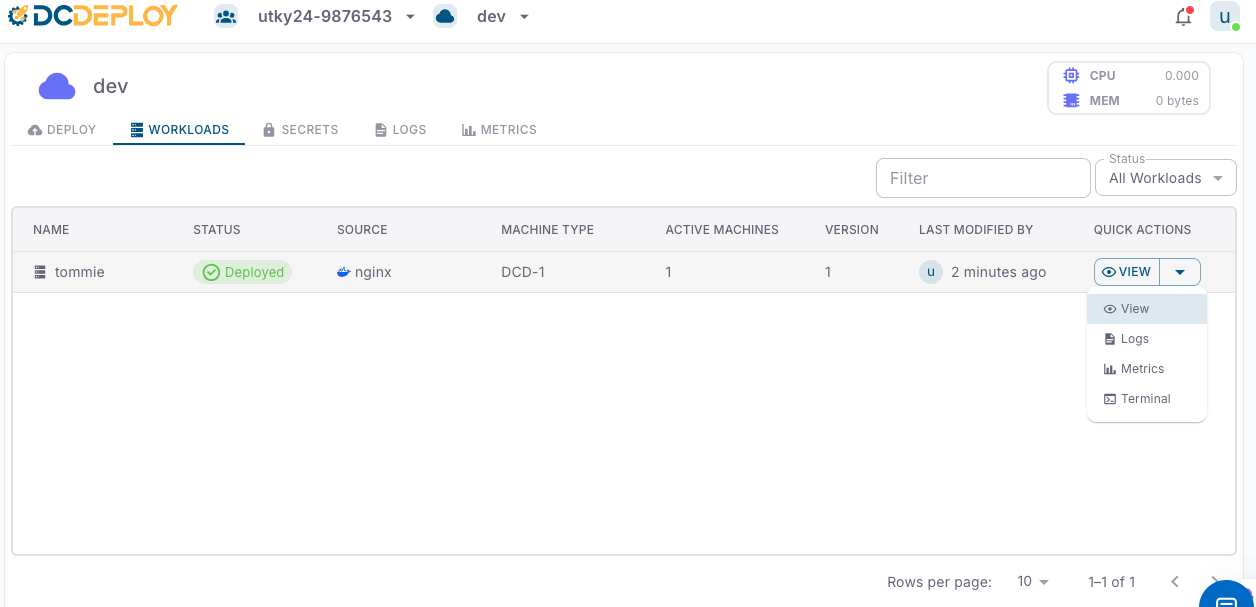 Each workload is listed with the following details:
* **Name**: The unique name of your service or database.
* **Status**: Current state of the workload (e.g., *Created*, *Accepted*, *Buiding*, *Started*, *Pulled*, *Pulling*, *Deployed*,*Failed*).
* **Source**: The origin of the workload (e.g., *Docker image*, *GitHub public/private repo*).
* **Machine Type**: The compute machine type allocated (e.g., *DCD-2*, *DCD-3*, etc..).
* **Active Machines**: Number of running instances for the workload.
* **Version**: The current deployed version.
* **Last Modified By**: The user who last updated the workload and timestamp of modification.
Use the **Status filter** or the **search bar** to quickly locate workloads by name or status.
The **Quick Actions** dropdown (⚙️ **View**) provides shortcuts to manage each workload:
* **View**: Inspect workload configuration and details.
* **Logs**: View real-time application logs for debugging and monitoring.
* **Metrics**: Analyze CPU, memory, and resource usage trends.
* **Terminal**: Access an interactive shell inside the running container for direct troubleshooting.
* Regularly check **Logs** to ensure application health.
* Use **Metrics** to fine-tune scaling and machine types.
* Keep workload versions updated to avoid stale deployments.
* For debugging, use the **Terminal** cautiously (production workloads should use secrets and configs instead of manual fixes).
Each workload is listed with the following details:
* **Name**: The unique name of your service or database.
* **Status**: Current state of the workload (e.g., *Created*, *Accepted*, *Buiding*, *Started*, *Pulled*, *Pulling*, *Deployed*,*Failed*).
* **Source**: The origin of the workload (e.g., *Docker image*, *GitHub public/private repo*).
* **Machine Type**: The compute machine type allocated (e.g., *DCD-2*, *DCD-3*, etc..).
* **Active Machines**: Number of running instances for the workload.
* **Version**: The current deployed version.
* **Last Modified By**: The user who last updated the workload and timestamp of modification.
Use the **Status filter** or the **search bar** to quickly locate workloads by name or status.
The **Quick Actions** dropdown (⚙️ **View**) provides shortcuts to manage each workload:
* **View**: Inspect workload configuration and details.
* **Logs**: View real-time application logs for debugging and monitoring.
* **Metrics**: Analyze CPU, memory, and resource usage trends.
* **Terminal**: Access an interactive shell inside the running container for direct troubleshooting.
* Regularly check **Logs** to ensure application health.
* Use **Metrics** to fine-tune scaling and machine types.
* Keep workload versions updated to avoid stale deployments.
* For debugging, use the **Terminal** cautiously (production workloads should use secrets and configs instead of manual fixes).