
1
Workload overview
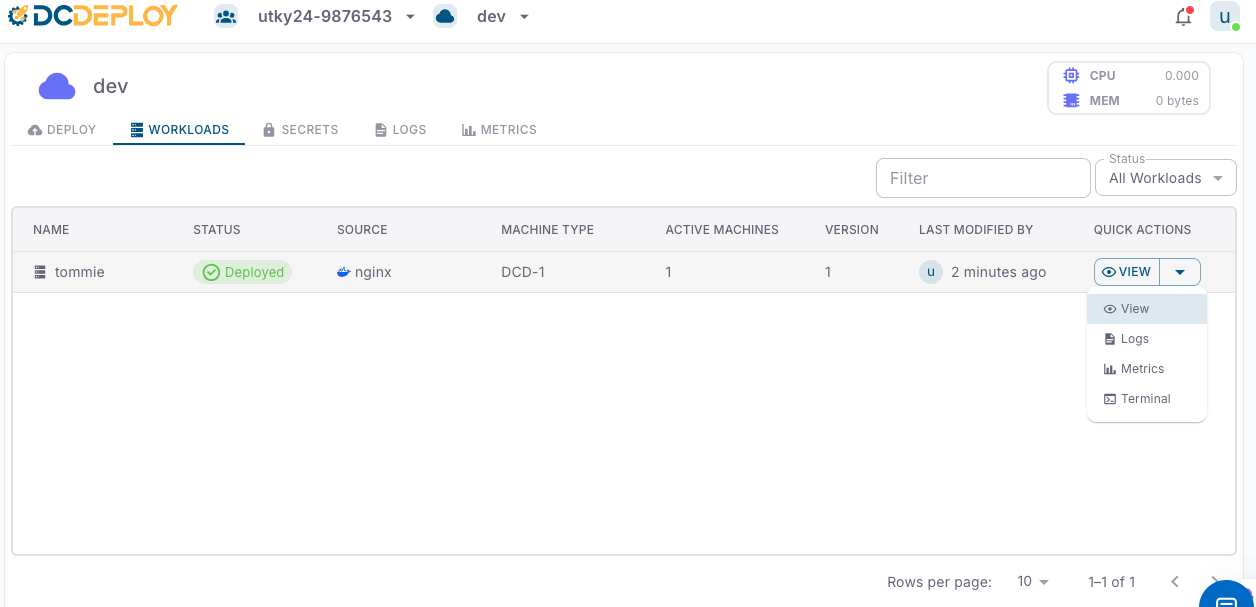
Each workload is listed with the following details:
- Name: The unique name of your service or database.
- Status: Current state of the workload (e.g., Created, Accepted, Buiding, Started, Pulled, Pulling, Deployed,Failed).
- Source: The origin of the workload (e.g., Docker image, GitHub public/private repo).
- Machine Type: The compute machine type allocated (e.g., DCD-2, DCD-3, etc..).
- Active Machines: Number of running instances for the workload.
- Version: The current deployed version.
- Last Modified By: The user who last updated the workload and timestamp of modification.
2
Filtering and searching
Use the Status filter or the search bar to quickly locate workloads by name or status.
3
Quick actions
The Quick Actions dropdown (⚙️ View) provides shortcuts to manage each workload:
- View: Inspect workload configuration and details.
- Logs: View real-time application logs for debugging and monitoring.
- Metrics: Analyze CPU, memory, and resource usage trends.
- Terminal: Access an interactive shell inside the running container for direct troubleshooting.
4
Best practices
- Regularly check Logs to ensure application health.
- Use Metrics to fine-tune scaling and machine types.
- Keep workload versions updated to avoid stale deployments.
- For debugging, use the Terminal cautiously (production workloads should use secrets and configs instead of manual fixes).